

Consider that you have an ideal living room layout in your head but are unsure of how to depict it. Maybe you’re trying to find ideas for decorating your new house, but you always think the online photos don’t look quite right.
Fortunately, you can now make these concepts a reality with the aid of AI image generation technology. Employing a designer doesn’t have to be expensive, and no prior experience in design is necessary. In a few minutes, you can observe the desired effect.
This article will take you through how to use AI tools to create home-related pictures, from basic operations to practical tips, so you can easily get started and enjoy a hassle hassle-free home decor experience.
Let’s get started!
Key Takeaways
- Understanding AI image generation and its practical tutorial
- Looking at the practical applications of AI image tools in the home field
- Discovering some exclusive tips to improve the AI image creation level
- Exploring some real-life implementations for better imagery perks
AI Image Generation Practical Tutorial
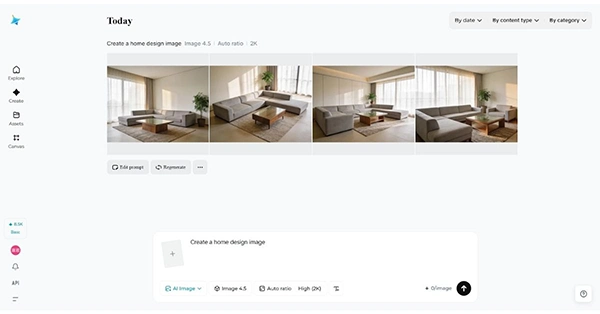
Today’s home design pays more and more attention to visual presentation. A good picture is worth a thousand words. Traditional methods either hire a photographer to take pictures or find a designer to make drawings, which is both time-consuming and expensive. Tools like an AI photo generator have changed this situation. Here are three useful AI tools and a step-by-step guide on how to use them:
Interesting facts
A 2025 report found that the share of interior designers adopting AI tools nearly tripled to 29%, up from just 9% in 2023, indicating growing professional acceptance.
1. Dreamina
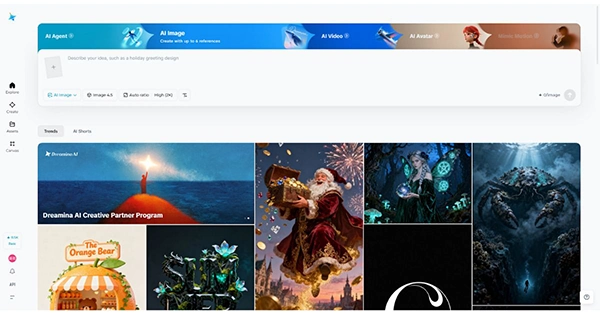
Dreamina provides an AI image tool specially built for creators, especially suitable for home design enthusiasts. It can solve your problem of having no materials and needing to produce images quickly. This tool’s greatest feature is its ability to create stunning visual works from your text descriptions or reference images.
Even novices can easily learn how to use the interface because of its intuitive design. It can be useful whether you’re creating illustrations for a home design plan or creating content for a blog about decorating.
Main Functions
- Dual input of text and images: Enter a text description to generate an image, or upload a reference image to let AI create according to a similar style
- Diverse style choices: Can generate images of various home styles, such as modern minimalist, Nordic style, new Chinese style, industrial style, etc.
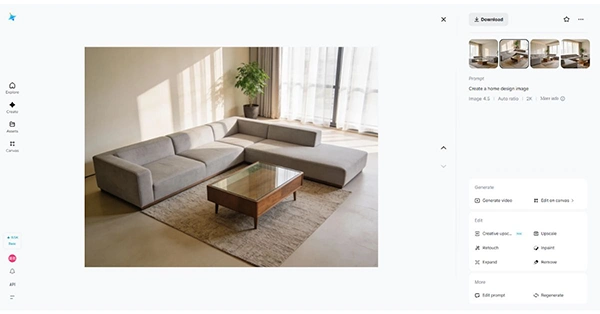
- One-click optimization function: Retouch function can optimize details, and Upscale can upgrade images to 4K clarity
- Intelligent modification tools: Remove and Inpaint functions can delete or add specific elements, such as changing the color of a sofa or adding a potted plant
Operation Steps
As these AI tools seem amazing and easy to use in almost every scenario, they still require a methodical approach to function seamlessly according to ideas and thought alignments. Let’s see some pivotal steps of these utilities.
Step 1: Enter Description
Open the Dreamina homepage and select “AI Image”, and describe the scene you want in detail here. The more specific the description, the better the generated effect. For example: “Generate a warm bedroom scene with a large white bed, a light gray headboard wall, a single sofa by the window, sunlight spilling in through white curtains, and the overall atmosphere is warm and comfortable.”
You can also upload a home picture you like as a reference and let the AI create according to this style. If you can’t think of how to describe it for a while, you can go to the explore page to see the ideas shared by others.
Step 2: Adjust Settings
After entering the description, start adjusting the generation parameters. First, select your favorite model style, and then increase the value in the “Quality” option. Dreamina supports adjusting the aspect ratio, with options such as 16:9, 9:16, 1:1, etc., suitable for different platforms. The size can also be customized as needed. After all settings are adjusted, click the “Generate” button.
Step 3: Export Work
The last step is to save your work. Click “Creative upscale” to get a 4K high-definition version; use “Retouch” to quickly optimize the picture effect. If you want to add certain elements, such as a chandelier, a hanging painting or a bouquet, you can use the “Inpaint” function. Just mark the position, explain what to add in the text box, and click “Generate”. After satisfaction, click “Download” to save the image.
2. Microsoft Copilot
Microsoft Copilot is an AI assistant tool launched by Microsoft that can be used to generate and edit images. Its design philosophy is to make operations as simple as possible and work seamlessly with other Microsoft applications. Through advanced algorithms, it can understand user instructions and generate corresponding visual content.
Main Functions
- Intuitive operation interface: Both professionals and beginners can use it easily
- AI-powered picture creation: Produce pictures from textual descriptions
- Versatile editing features: Able to fine-tune created images
- Integration with Microsoft suite: Smoother use in the Microsoft 365 environment
- Real-time collaboration: Team members can participate in image projects together
- Customizable output: Can adjust the style, composition and detail level of generated images
- Smart suggestions: Provide smart recommendations for optimizing design
Usage Steps
Step 1: Log in to Account Open a compatible Microsoft Copilot app and log in with your email or Microsoft account.
Step 2: Enter Requirements Describe the image content you want to generate in detail. Specify the key features, styles or elements you need.
Step 3: Generate and Edit Start the AI generation function to create images based on descriptions. Then use editing tools to adjust and optimize.
Step 4: Save Work After completing the creation, click the “…” icon to download your work.
3. ChatGPT Plus with Dall-E 3
ChatGPT Plus combined with Dall-E 3 integrates dialogue capabilities and image generation capabilities. This combination provides a comprehensive AI tool that can understand and generate text and images at the same time. Suitable for scenarios requiring creativity and practical functions.
Main Functions
- Advanced text generation: Use GPT capabilities to generate coherent, context-aware replies
- Cutting-edge image creation: Use Dall-E 3 to generate detailed images based on text descriptions
- Multimodal interaction: Seamlessly switch between text and image generation
- Customization options: Can adjust the style, content and complexity of text and images
- High-quality output: Generate professional-level text and images
- Interactive learning: Can be optimized based on user feedback
- Security and privacy: Ensure user data is handled confidentially and securely
Usage Steps
Step 1: Access Platform Log in to the ChatGPT Plus platform. Make sure you have an active subscription account.
Step 2: Propose Requirements Clearly enter your request, specifying whether you need text content, images, or both. For example: “Design a modern AI logo for a decoration company named ‘Warm Home’.”
Step 3: Interaction and Optimization After generating initial results, you can request text adjustments or image modifications. If satisfied, click the “Download” button in the upper left corner.
Practical Applications of AI Image Tools in the Home Field
Tools like Dreamina’s free AI art generator are changing the home design and interior decoration industry, showing unique value in multiple scenarios.
Decoration Plan Presentation:
Decoration companies can quickly create design renderings of different styles for customers, which boosts sales and makes it easier for customers to see the decoration.
Home Content Creation:
Bloggers and self-media authors can provide illustrations for articles and generate home scene pictures that match the theme to make the content more attractive.
Product Display Scenarios:
Furniture merchants can display products in different indoor scenes to help buyers better imagine what the products will look like in their own homes.
Social Media Materials:
When sharing home inspiration on platforms like Xiaohongshu and Douyin, AI can be used to generate unique and eye-catching visual content to increase exposure and interaction.
Personal Decoration Planning:
Homeowners preparing for decoration can visualize their ideas, try different color schemes and layout plans, and find the most satisfactory design.
Brand Visual Building:
Home brands can use AI to generate promotional materials with a unified style, including logos, posters, banners, etc., to establish a professional brand image.
Exclusive Tips to Improve AI Image Creation Level
You need to learn some useful tricks if you want to make the most of AI image generation tools. Whether you want to apply AI to your work or simply explore AI art creation out of interest, these methods can help you improve the quality of your work.
Tips for Writing Good Descriptions
- Add specific details such as color, style, and scene
- Provide background information to make the picture richer
- Use more adjectives and adverbs to enhance expressiveness
- Clearly specify the art style, such as minimalist modern, retro nostalgic or realistic photography style
Try Different Styles and Settings
- Start with style templates or presets
- Gradually adjust brightness, contrast, saturation and style intensity
- Mix different styles or types to create unique effects
- Optimize AI output results through repeated adjustments
Solve Common Problems
- Increase the resolution and clarity of input images to improve output quality
- Optimize reference image selection or adjust style settings for more consistent results
- Provide more detailed instructions to make results more in line with expectations
- Reduce resolution or use simpler images to speed up processing
Summary
AI image generation technology has brought new possibilities to fields such as home design and decoration planning, making creative expression more efficient and personalized. Both people and companies can use AI-generated images to draw attention, streamline intricate design concepts, and improve brand image by using the techniques described in this article, which range from selecting the appropriate tools to perfecting the end result.
Among many tools, Dreamina stands out with its friendly interface, excellent generation quality and rich functions. Whether you are doing marketing promotion or creating home content, Dreamina can help you turn your ideas into reality. This AI photo generator is especially suitable for scenarios requiring rapid image production, and its free AI art generator function allows everyone to easily create professional-level works. If you need to design a logo for a home brand, you can also try its AI logo generator.
Start using Dreamina now and see what surprises AI can bring to your home project.
FAQ
Can AI-generated images be used commercially?
Most images generated by AI tools can be used commercially, but it is recommended to check the specific platform’s terms of use before use. Typically, Dreamina-generated images can be utilized for business purposes.
How long does it take to generate an image?
It usually takes a few seconds to dozens of seconds to generate an image, depending on the complexity of the image and the server load.
Are AI-generated home images realistic?
Although AI-generated images are virtual creations, they can be very realistic. They are suitable for effect display, inspiration reference and content creation, but cannot replace actual decoration construction drawings.
Do I need professional design knowledge to use these tools?
Not at all. Because of their user-friendly design, these AI tools are easy for regular people to use. The tool can assist you in achieving your desired image as long as you can articulate it.
Can I use these tools for free?
Many AI image generation tools provide free versions. As a powerful generator, Dreamina offers daily free credits for every user.